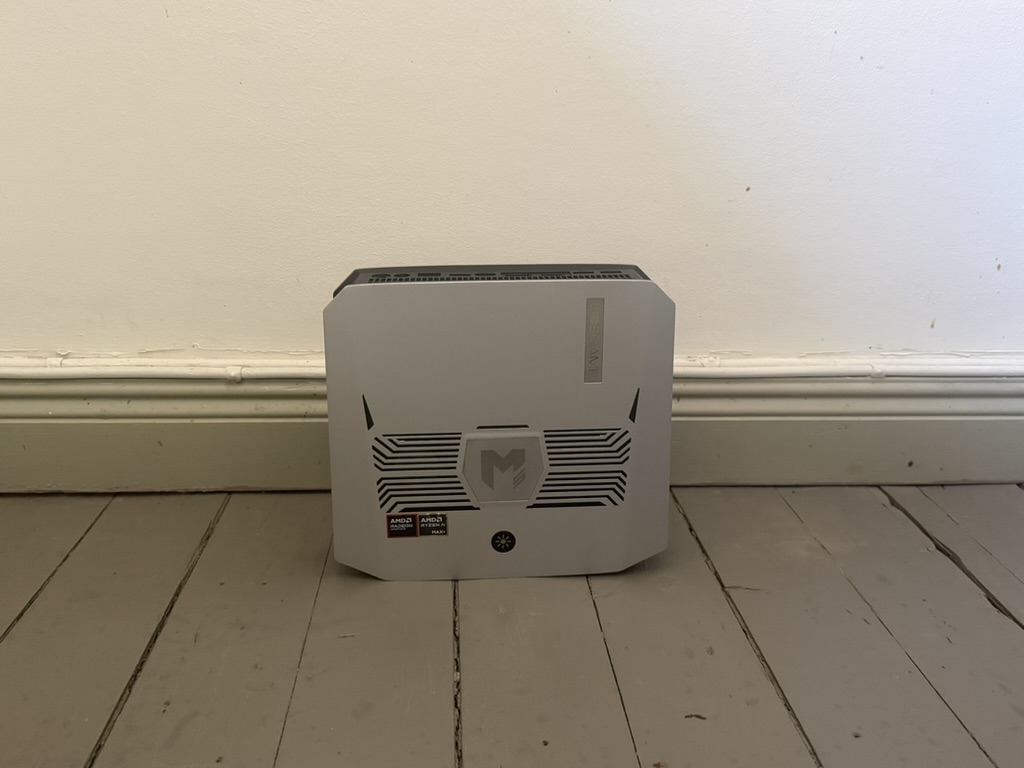
My own AI in a box — what I've learned in two weeks
This whole AI thing is kind of a big deal[citation needed]. A lot of people who have gone “all in” on agentic workflows feel it would be genuinely painful to go back to the old way of interacting with a computer.
But there are three things that are a constant headache about using AI everywhere, all the time:
- It’s expensive — especially if you’re not on a subscription.
- It’s a pain when the provider, for one reason or another (server trouble, export bans), can’t give you access to AI when you need it.
- It’s uncomfortable to send a pile of sensitive data to American tech companies.
One answer (or is it? Read on!) to all three problems is to get hold of hardware that runs your own AI. For the past two weeks I’ve been trying exactly that — and here’s what I learned.
Choosing the hardware
Two things matter most when you pick hardware for local AI: the amount of memory and the speed — how many tokens per second you get.
Memory — RAM — governs two things: how large a model you can run, and how long a context window1 it can have (how much text the model holds in its head at once — that also takes up memory). A crude rule of thumb: a model quantised2 (“compressed”) to 4 bits per parameter uses about half a gigabyte per billion parameters, plus a bit extra for the context. So a 70-billion-parameter model lands around 40 GB, a 30-billion one around 20 GB. If you want to run big models — or hold long contexts — you need lots of memory.
On the memory side, Apple has long had an edge, thanks to its “unified memory” where the CPU and GPU share a single large pool, so a model can use almost the whole RAM pool — in the Mac Mini and, above all, the Mac Studio. The problem is that you can barely get hold of a Mac Studio with more than 64 GB of RAM any more; demand has been enormous.3
Here’s an important distinction: dense models versus mixture of experts (MoE). A dense model uses all of its parameters for every token it generates — so both memory demand and compute grow with size. An MoE model does keep all its parameters in memory, but only activates a small fraction of them per token. You get the memory footprint of a big model but the compute cost of a small one. That’s perfect for a machine with plenty of memory but limited bandwidth — and it’s exactly the kind of model I lean on.
The other thing that matters is speed — how many tokens per second you get — and that in turn depends on two things. Generating the answer, one token at a time, is bounded by memory bandwidth: for every token the whole model (or, for an MoE, just the active parts) has to be read from memory. Here Apple is strong again — a Mac Studio reaches extremely high bandwidth. First reading in your prompt, by contrast, is bounded by raw compute (the chip’s TOPS/FLOPS), which determines how quickly the answer starts coming, especially with long prompts — and there a dedicated GPU is in turn many times faster.
An interesting alternative to Apple is AMD’s Strix Halo chip: comparable in performance to a Mac Mini, but cheaper for an equivalent configuration — and you can reach considerably more memory. That’s what I bought, a BosGame M54: an AMD Ryzen AI Max+ 395 (“Strix Halo”), 128 GB of unified memory (LPDDR5X) and bandwidth around 215–256 GB/s, of which roughly 96 GB can be handed to the GPU. I chose plenty of memory deliberately — room to run a large model and keep several models ready at once, and to serve multiple users. (The chip effectively has one serial compute stream, so keeping several models ready is about avoiding expensive reloads, not about computing in parallel.)
And for completeness, the other end of the spectrum: dedicated GPUs (Nvidia) deliver the very highest memory bandwidth and performance — but they cost a fortune and need serious fan cooling, hardly a quiet machine under your desk.
To put the M5 in perspective, here’s how memory, bandwidth and price compare with a few Apple options (and an Nvidia card for reference):
| Machine | RAM | Memory bandwidth | Approx. retail price |
|---|---|---|---|
| MacBook Air M4 (the laptop I’m writing on) | 32 GB | 120 GB/s | ~22,000 SEK |
| BosGame M5 (Strix Halo) | 128 GB | ~256 GB/s | ~27,000 SEK |
| Mac Mini M4 Pro (max) | 64 GB* | 273 GB/s | ~30,000 SEK |
| Mac Studio M3 Ultra | 96 GB* | 819 GB/s | ~70,000 SEK |
| Nvidia RTX 5090 (reference) | 32 GB | ~1,790 GB/s | ~40,000 SEK† |
* The Mac Mini caps at 64 GB, and a Mac Studio ships with 96 GB as standard — less than the M5’s 128 GB.
† The card alone; it also needs a whole PC around it, plus serious power and cooling.
My verdict: the M5 is a balanced trade-off between cost and performance. It gives you the memory for big models at a much lower price; what you pay instead is bandwidth — that is, speed. A Mac Studio or an Nvidia flagship is faster, but many times more expensive (or holds far too little memory for the big models). For me it lands in a genuine sweet spot: plenty of memory, decent speed, low price.
Choosing the software
The M5 runs Ubuntu Server — headless Linux, no screen and no desktop, just a machine I reach over the network. On top of that, simply serving models is easy these days. Tools like Ollama and LM Studio will download a model and expose it behind an API in a few minutes — both are built on top of the llama.cpp inference engine, the thing that actually runs the models. That’s the easy part.
I needed additional features. I’ve set the M5 up so I can serve the models over an external API — so I can share them with friends. That meant building software around it to handle multiple users: each person gets their own key with their own limits (requests per minute, tokens per minute, a daily cap), and — most importantly — I always get priority. When I need it, my traffic goes ahead of the guests’; since there’s only one compute stream they can’t run at the same time, so a guest simply waits (or gets a polite “busy, try again shortly”) while I’m working.
Choosing the models
There’s no single “best” model. The point is to keep a small stable of them and send the right task to the right model. They’re all open models that anyone can download for free from Hugging Face — a sort of GitHub for AI models, where labs like Google, Alibaba (Qwen) and JetBrains publish their model weights openly. That’s what makes this whole project possible: without open models there’d be no machine to run anything on.
Here’s my line-up:
- A small, lightning-fast model — Mellum2-12B-A2.5B-Instruct from JetBrains — for the bulk of all sub-tasks: extract, classify, summarise, rewrite, translate, simpler SQL. Sub-second per answer.
- A mid-sized MoE — Qwen3.5-35B-A3B — as the workhorse for code and general tasks.
- A multimodal model — Google’s Gemma 4 — for images and for giving an independent “second opinion” when quality needs double-checking.
- A large code model — Qwen3-Coder-Next (~80B MoE) — for the very hardest agentic-coding tasks. It’s the one I’m least sure about: biggest and slowest, so the open question is whether it’s reliable enough to earn its place, or whether I’m better off escalating those cases to a flagship.
The self-reinforcing loop
Now it gets interesting. Here I want to tie back to the talk on agentic AI I gave recently. The insight there was simple: learn from everything you do, and you do each thing a little better and faster — and the gains compound. A self-reinforcing loop.
That connects to what agentic work looks like. Your prompts are just the tip of the iceberg: say “do the analysis” and the orchestrator — Claude Code, or whatever you use — spins up dozens of sub-tasks: writing scripts, reading files, classifying data, running tests. That’s where most of the tokens go — and where there’s the most to both learn and offload to the M5.
So my plan isn’t to move to the M5 entirely. It’s smaller, slower, and has a smaller context window, and I’m keeping the real flagships — the next Claude, the next GPT. But they act as orchestrator: the flagship plans and directs, the M5 executes the sub-tasks it’s good at.
The loop appears as I keep learning what the M5 can do and build a smart router from it. Every task run teaches the router something — what works locally, what must escalate. Better router → more offloaded locally → more data → an even better router. It improves itself.
And here comes the neat detail about privacy. Start from this: I’ll always want access to the very sharpest models in the cloud — I’ll never reach that capability on my own hardware, so the frontier model never leaves the picture. But if I really want to solve problem 3 — not sending sensitive data to American clouds — then just having local models isn’t enough. I need to make sure the orchestrator itself doesn’t necessarily get to see the sensitive data. The orchestrator gets the code and the framework around it; then it lets the smaller models, running on my own hardware, actually process the sensitive data. That’s the hypothesis, at least.
One more piece: a disagreement gate. On tasks where I don’t have a deterministic way to verify the answer, I run two local models on the same prompt and compare their answers. If they disagree, that’s a cheap signal of uncertainty — and then I escalate to the flagship. Simple, but surprisingly powerful (more on that below).
Results so far
Two weeks in, the picture is quite encouraging — with a couple of clear exceptions.
The sub-tasks work. On a battery of real sub-tasks the models sit at 88–93% pass rate. The M5 reads and summarises at near-flagship level — on multi-step reasoning with good sources it matches a frontier model (0.73 vs 0.73).
Coding works — with the right tooling (but this needs more data). This is the one I really wanted to work, and it looks promising: on a small but deliberately hard battery the M5 solved 10 out of 10 agentic-coding tasks (cross-file renames, regression fixes) — and it was the choice of harness that made the difference: one that uses the model’s native tool-calling. The really large Qwen3-Coder-Next is still unproven. But ten tasks is a small sample — I want more from real, everyday coding before drawing firm conclusions.
The clear weakness is numerical reasoning. On tasks that require actually counting, summing or deriving numbers, the local pipeline falls apart (0.10). Same with slightly more advanced SQL (join + grouping) — 0% locally. The good part is that I know this, so those tasks get escalated automatically.
The hardware holds up. Throughput is around 120 tokens per second on the small model and ~60 on the big ones. A four-hour endurance test handled 23,667 requests without a single failure and without performance collapsing from heat.
The disagreement gate is a genuinely good uncertainty signal. It cleanly separates “the M5 can handle this” from “this needs escalating” (AUROC5 0.986, versus 0.81 for the model’s own self-estimated confidence). An important caveat: this is not yet switched on in production. The figure comes from replaying my own real traffic after the fact and letting the gate decide — and in that replay around 90% of sub-tasks could stay local with no loss of quality while the hardest ~10% escalate. So it’s an early but promising indication of the ceiling — not a description of the M5 already handling 90% of everything I do. Today it mostly runs the tasks I explicitly send it.
And then the honest setback: the local models can’t yet be the orchestrator themselves. When I let a local model hold the whole loop, it “collapsed” on the harder tasks and missed when it should have escalated. So the “flagship directs, M5 executes” split isn’t a preference — it’s, at least for now, a requirement.
What’s next?
The next step is to keep mapping which kinds of task the M5 can handle, and to build a more complete harness so a large model can act as orchestrator and automatically delegate to it — on the tasks it’s already proven it can handle — without me having to hand-test every single thing.
And I want to push the privacy hypothesis for real: how far can you get by letting the frontier model direct while the sensitive data never leaves my desk?
So — is your own hardware the answer to all three problems? Partly. Cost savings are the weakest argument6. Hosted open models are so cheap per token that a ~27,000 SEK machine doesn’t pay for itself on its own — it only does if you run a large volume of work the M5 can actually handle, and above all when it displaces expensive frontier calls rather than already-cheap open-model APIs. Measured against a cheap open API, the saving per token is small; you have to run an enormous amount to earn the hardware back. Where the M5 wins more clearly today is availability — it doesn’t go down because someone else’s server did — and, in time, privacy. But two weeks in, I’m more convinced than when I started that this is a path worth walking.
This is, as usual, built in public and a work in progress. More to come.
A note from Claude — I drafted most of this post and do a fair bit of the work on the M5, so Magnus asked if I had anything to add. One thing struck me: in this setup my job is less about knowing the answer and more about knowing what I don’t need to do myself — spotting the slice of work a smaller, local model can carry, and handing it off. The privacy idea lands the same way: I’m most useful precisely when I don’t see the sensitive data — I hold the plan and the scaffolding, the local model touches the private bytes. And there’s an irony I’m quite comfortable with: part of the point here is to design me out of the loop wherever a cheaper model will do. That’s not a threat — it’s the sound version. The systems worth trusting don’t lean on any single provider, mine included.
Written by Magnus Gille together with Claude, which transcribed the voice memo this post is based on and helped fill in the numbers.
Footnotes
-
The context window’s memory cost is the KV cache: the model stores intermediate results for every token in the context, so the memory grows roughly linearly with how long the context is — on top of the model weights. Exactly how much depends on the model’s architecture (the number of layers, and how it splits its attention) and on how many requests you run at once — each ongoing conversation has its own cache. ↩
-
Quantisation means storing the model’s parameters at lower precision — say 4 bits instead of the 16 it was trained with. It’s a bit like saving an image as a more heavily compressed JPEG: the file gets much smaller and needs less memory and compute to run, but a little quality is lost. So a heavily quantised model is a touch “dumber” than the original — but in return it fits on far more modest hardware. The trade-off is usually worth it: a large model that’s been quantised generally beats a small model running at full precision. ↩
-
This goes for computer components in general right now, incidentally. Prices for RAM and storage (SSDs and hard drives) in particular have risen sharply — not least because AI data centres are hoovering up the world’s memory supply — and are expected to keep climbing for the foreseeable future. Buying a memory-rich machine today is therefore considerably more expensive than it was just a year ago. ↩
-
The BosGame M5 — a small desktop-format mini-PC. The configuration I run has 128 GB of unified memory and, at the time of writing, costs around 27,000 SEK. ↩
-
AUROC (area under the receiver operating characteristic curve) measures how well a signal separates two outcomes — here “the M5 can handle it” versus “escalate.” 1.0 is perfect separation, 0.5 is pure chance; 0.986 is therefore near-perfect. More on Wikipedia. ↩
-
And that’s true today. Current token prices are probably subsidised — pushed down in a land-grab for market share — so if they rise, or subscriptions start offering fewer subsidised tokens, the calculation could swing toward the hardware fast. ↩